Hours into a live stream, your back begins to ache, your posture slumps, and your energy visibly fades on camera. For content creators who spend four, six, or even ten hours a day at their desks, this scenario is all too familiar. Back pain and physical fatigue are among the most common reasons streamers struggle to maintain consistent schedules, and yet the solution often gets overlooked in favor of upgrading microphones or lighting rigs.
A quality lumbar support chair is one of the most impactful investments a streamer can make — not just for comfort, but for on-camera presence, mental focus, and long-term health. The challenge, however, is finding a chair that delivers genuine ergonomic support without draining your equipment budget or clashing with your carefully curated streaming aesthetic. The market is flooded with options that promise everything and deliver little.
This guide cuts through the noise. Whether you’re building your first streaming setup or upgrading an existing one, you’ll find practical criteria for evaluating lumbar support chairs, insight into affordable quality gaming chairs like the AutoFull M6 Series, and a clear step-by-step selection process designed specifically for content creators who need their workspace to perform as hard as they do.
Why Lumbar Support is Non-Negotiable for Streamers
Streaming isn’t a passive activity. Holding a consistent position for hours while managing chat, monitoring audio levels, and staying energetic on camera places significant physical demands on your body. Without proper support, the lumbar spine — the lower curve of your back — gradually flattens under the weight of your torso, leading to muscle fatigue, nerve compression, and the kind of persistent discomfort that quietly erodes your ability to perform. A lumbar support chair counteracts this by maintaining the spine’s natural inward curve, distributing your body weight more evenly and reducing the muscular effort required just to sit upright.
The Connection Between Posture and Streaming Success
Your posture tells a story on camera before you say a word. Viewers notice when a streamer starts slouching — energy drops, facial expressions tighten, and the sense of engagement dims. Proper lumbar support keeps your pelvis tilted correctly, which in turn aligns your shoulders and lifts your head into a more confident, camera-ready position. Streamers who maintain good posture throughout a session tend to speak more clearly, gesture more naturally, and project higher energy levels — all of which directly influence viewer retention and channel growth. Something as mechanical as chair support becomes, in practice, a content quality variable.
Long-Term Health Impacts for Content Creators
The cumulative toll of poor seating is serious. Chronic lower back pain is one of the leading reasons content creators quietly reduce their streaming frequency or abandon consistent schedules altogether. Conditions like herniated discs, sciatica, and postural kyphosis develop gradually and are far easier to prevent than to treat. Investing in a quality lumbar support chair now functions as injury prevention — protecting not just your physical health but the consistency of your streaming career. For creators whose income depends on showing up regularly, that protection is a professional necessity, not a luxury.
Essential Features of Quality Gaming Chairs for Streamers
Not every chair marketed to gamers actually supports the demands of streaming. When you’re evaluating quality gaming chairs, the goal is to identify features that serve both your body and your broadcast environment. Four attributes deserve serious attention: adjustable lumbar support, material construction, build durability, and visual design. Getting all four right means your chair works as a functional ergonomic tool and a deliberate piece of your streaming aesthetic — two requirements that are equally important when your workspace is also your stage.
Adjustable Lumbar Support Mechanisms
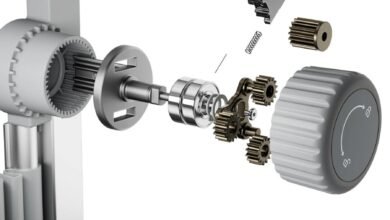
The single most important feature in any lumbar support chair is how precisely it can conform to your specific body. Generic fixed lumbar cushions are better than nothing, but they rarely land at the right height or apply pressure at the right depth for every user. Look for chairs that offer both vertical height adjustment — so the support aligns with your lumbar curve rather than your mid-back — and depth or firmness control, so you can dial in how aggressively the support pushes forward. Some chairs include a 4D lumbar system that lets you fine-tune position in multiple directions. For streamers who shift position frequently during long sessions, this kind of customization is the difference between a chair that helps and one that creates a new source of discomfort.
Material Quality and Build Durability
Material choice affects both how a chair feels during an eight-hour stream and how long it holds up over years of daily use. Memory foam padding conforms to body contours and distributes pressure effectively, making it a strong choice for the seat base and lumbar insert. PU leather offers a clean, professional look and is easy to wipe down — relevant for streamers who eat or drink at their desks — though it can retain heat during long sessions. Mesh backrests solve the breathability problem but vary widely in tension quality; cheap mesh sags within months. Whatever material you choose, examine the frame construction: a steel or reinforced base with a high weight rating signals long-term reliability that budget chairs with plastic frames simply cannot match.
Design and Aesthetics for a Professional Setup
Your chair occupies significant real estate in your camera frame. Viewers register the visual coherence of your setup instinctively, and a chair that clashes with your lighting, desk, or background undermines the professional impression you’ve worked to build. When evaluating gaming accessories for your stream, consider the chair’s color palette against your existing setup — neutral tones like black, white, or gray integrate easily, while bold accent colors can reinforce a brand identity if used intentionally. Avoid chairs with excessive logos or aggressive styling that dates quickly or conflicts with your channel’s visual tone. The best streaming chairs look deliberate on camera, not like afterthoughts pulled from a gaming peripheral catalog.
Evaluating Affordable Gaming Chairs Without Sacrificing Quality
Price is a real constraint for most streamers, particularly those still building their audience and monetization. The good news is that the gap between budget chairs and genuinely ergonomic ones has narrowed considerably as competition in the gaming accessories market has intensified. The key is learning to distinguish chairs that are affordable because they’ve cut costs smartly from those that are cheap because they’ve eliminated the features that matter. Prioritize lumbar adjustability, frame integrity, and material quality above everything else — these are the attributes that determine whether a chair supports you through a five-hour stream or starts failing you within six months.
Spotting Value in the AutoFull M6 Series and Similar Models
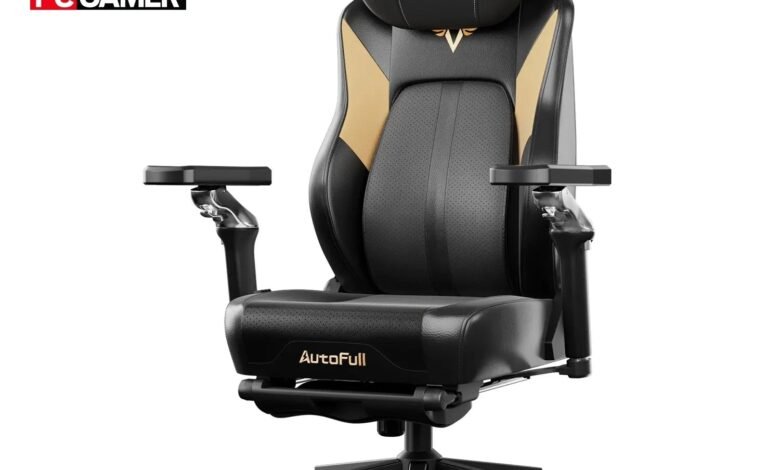
The AutoFull M6 Series is a useful reference point when evaluating mid-range lumbar support chairs for streaming. It offers a 4D adjustable lumbar support system — meaning you can tune the position vertically, horizontally, and in terms of depth — which is a feature typically reserved for higher-priced ergonomic chairs. The design leans clean and minimal rather than aggressively styled, which translates well on camera without dominating your visual backdrop. Memory foam padding on the seat and lumbar insert adds pressure relief for long sessions, and the build quality reflects a steel frame construction that holds up under daily use. When comparing similar models in this category, look for chairs that match these specifics: multi-axis lumbar adjustment, foam density that doesn’t compress flat within weeks, and a weight capacity that gives the frame meaningful structural margin beyond your own body weight.
Budgeting Tips for Streamers
Treat your chair as infrastructure rather than a peripheral. Microphones and cameras can be upgraded incrementally, but a chair that causes injury or chronic fatigue affects every stream you produce. Set a budget floor — not a ceiling — based on what features you require, then shop within that range rather than defaulting to the lowest available price. If budget is tight, buying a refurbished or open-box chair from a reputable brand often delivers better ergonomic value than a new chair at the same price point from an unknown manufacturer. Factor in the cost of replacement: a chair that lasts three years at a moderate price outperforms one that costs half as much but degrades in eighteen months.
Step-by-Step Guide to Selecting Your Lumbar Support Chair
Knowing what features matter is only half the equation. The other half is applying that knowledge to your specific situation — your room dimensions, your camera angle, your body, and your budget. This four-step process gives you a structured way to move from research to a confident purchase decision without second-guessing yourself mid-checkout.
Step 1: Assess Your Streaming Environment and Needs
Start by measuring your desk height and the distance between your seat and your monitor. These numbers determine the seat height range your chair needs to accommodate. Then review your camera angle — if your webcam captures your torso and chair back, the chair’s visual profile matters significantly. Sit in your current chair and note exactly where discomfort develops: lower back, hips, or shoulders. That tells you which ergonomic features to prioritize. A streamer with hip flexor tension needs a different seat depth than one whose primary complaint is lumbar fatigue. Be specific about your body’s actual feedback rather than shopping by generic recommendation.
Step 2: Research and Compare Models, Including AutoFull M6
Build a shortlist of three to five chairs that meet your environment and ergonomic requirements, then compare them across four criteria: lumbar adjustability range, material durability, weight capacity relative to your own, and visual design compatibility with your setup. The AutoFull M6 Series is worth including in that comparison for its multi-axis lumbar system and camera-friendly aesthetic. Cross-reference manufacturer specifications with independent user reviews — pay particular attention to feedback from people who use the chair for five or more hours daily, since casual reviewers rarely stress-test the features that matter most to streamers.
Step 3: Test for Comfort and Support Before Committing
If a showroom option exists nearby, sit in your shortlisted chairs for at least fifteen minutes in a posture that mimics your streaming position — upright, arms forward, eyes level. If purchasing online, prioritize retailers with generous return windows, ideally thirty days or more. Read long-form reviews that describe how the chair feels after extended use rather than first impressions. Specifically look for commentary on whether the lumbar support maintains its position during movement and whether the foam retains its density after months of use. These details predict real-world performance far better than specification sheets.
Step 4: Finalize Your Choice and Integrate into Your Setup
Once you’ve selected your chair, allow time during assembly to calibrate every adjustment — seat height, lumbar position, armrest height — before your first stream. Spend a full session with the chair before locking in your settings permanently; your body needs time to register what proper support actually feels like, especially if you’ve been using an unsupportive chair for months. After adjustment, recheck your camera frame to confirm the chair’s visual profile works with your backdrop. If the color or design needs softening, a neutral desk mat or adjusted lighting can integrate it more cohesively. Treat the setup as complete only when both your body and your camera frame confirm the chair is working as intended.
Invest in Your Chair, Invest in Your Stream
Selecting the right lumbar support chair is one of the most consequential decisions a streamer can make — not because it’s glamorous, but because it quietly determines how long you can perform, how you appear on camera, and whether your body holds up through years of consistent content creation. The right chair maintains your spine’s natural curve, keeps your posture camera-ready through marathon sessions, and prevents the gradual physical wear that derails so many streaming careers before they reach their potential.
The features worth prioritizing are clear: adjustable lumbar mechanisms that fit your specific body, durable materials that hold up under daily use, and a design that integrates naturally into your visual setup. Chairs like the AutoFull M6 Series demonstrate that affordable gaming chairs can deliver genuine ergonomic value without forcing you to choose between your back and your budget. And with the four-step selection process outlined here — assessing your environment, comparing models, testing for real-world comfort, and integrating thoughtfully into your setup — you have a concrete path from research to confident purchase.
Apply this framework to your own situation, prioritize function alongside aesthetics, and treat your chair as the foundational piece of streaming infrastructure it truly is. Your body — and your audience — will notice the difference.