Every year, mid-sized companies lose thousands of dollars to payroll errors, buddy punching, and the administrative burden of manual attendance tracking. A single misrecorded shift can ripple through payroll, compliance reports, and employee trust. As workforces become increasingly mobile and distributed, the old methods of tracking time—paper timesheets, honor systems, and basic punch clocks—simply cannot keep pace. This is precisely why GPS technology has emerged as a game-changer in human resources management. HR managers today face a pressing challenge: how to accurately track when and where employees work without drowning in spreadsheets or chasing down discrepancies. Premium GPS time clock tools offer a powerful answer, combining real-time location verification with automated hour calculation to eliminate guesswork and reduce costly errors. In this article, we’ll explore the essential features that define these advanced systems, examine how they deliver measurable cost savings and operational efficiency, and walk through a practical implementation roadmap designed specifically for HR managers ready to modernize their attendance management.
The Evolution of Attendance Management: Why GPS Time Clocks Are Essential
For decades, companies relied on punch cards, paper timesheets, and basic spreadsheets to track employee hours. These methods worked passably when everyone reported to the same building at predictable times, but they were always vulnerable to human error, intentional manipulation, and the sheer tedium of manual data entry. As businesses expanded and workforces became more mobile, these legacy systems began to crack under pressure. A construction crew spread across three job sites, a healthcare staffing agency deploying nurses to different facilities, or a sales team constantly on the road—none of these scenarios fit neatly into a wall-mounted punch clock.
The shift toward digital solutions began with basic online timesheets, but the real breakthrough came with GPS integration. A time clock with GPS tracking solves the fundamental question that haunts every HR manager overseeing distributed teams: not just when employees clock in, but where. By anchoring each time entry to a verified geographic location, these systems eliminate buddy punching, discourage early clock-ins from home, and provide auditable proof of on-site presence for labor compliance purposes. For mid-sized companies managing field workers, remote staff, or multi-location operations, GPS-enabled time clocks have moved from a nice-to-have innovation to an operational necessity—and premium tools take this foundation significantly further.
Unveiling the Core Features of Premium GPS Time Clock Tools
What separates a premium GPS time clock from a basic tracking app comes down to the depth and integration of its core functionalities. These aren’t simple check-in tools—they’re comprehensive workforce management platforms designed to address the specific pain points HR managers face daily.
Accurate GPS Tracking for Real-Time Location Verification
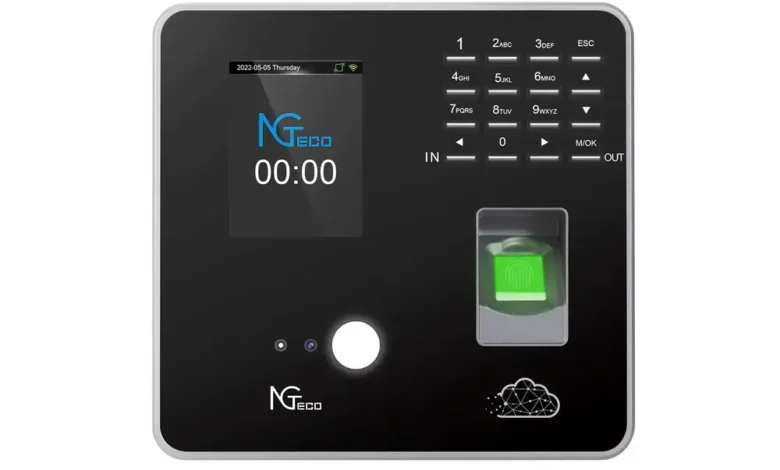
At the heart of any premium system is precise GPS tracking that confirms employees are physically present at designated work locations when they clock in. This goes beyond a simple coordinate stamp. Advanced tools use geofencing—virtual boundaries drawn around job sites—to automatically validate or reject clock-in attempts based on an employee’s position. If a worker tries to punch in from their driveway instead of the warehouse, the system flags it immediately. Hardware providers like NGteco have developed dedicated time clock devices that combine biometric verification with GPS capabilities, offering a robust physical infrastructure that complements software-based solutions. For industries subject to labor regulations requiring proof of on-site presence, such as government contracting or healthcare, this location verification creates an automatic compliance trail that auditors can review without HR staff compiling records manually.
Automatic Hour Calculation to Streamline Payroll
Premium GPS time clock tools eliminate the gap between raw time data and payroll-ready numbers. Once an employee clocks in and out, the system automatically calculates regular hours, overtime, break deductions, and shift differentials according to rules you configure. This automatic hour calculation removes the spreadsheet gymnastics that consume HR teams every pay period. Better yet, these tools integrate directly with popular payroll platforms, pushing verified hours into processing workflows without re-entry. The result is fewer payroll corrections, faster processing cycles, and employees who trust their paychecks are accurate.
Advanced Reporting and Analytics for HR Insights
Beyond tracking and calculating, premium tools transform attendance data into actionable intelligence. Customizable dashboards reveal patterns—chronic tardiness at specific locations, overtime trends by department, or seasonal attendance dips—that help managers make informed scheduling decisions. These reporting features allow HR leaders to move from reactive problem-solving to proactive workforce optimization, identifying issues before they escalate into costly disruptions.
Solving HR Managers’ Needs: Cost-Effectiveness and Automation in Action
For HR managers at mid-sized companies, every hour spent chasing timesheets or correcting payroll errors is an hour stolen from strategic work—talent development, culture building, and workforce planning. Premium GPS time clock tools directly address this drain by automating the most labor-intensive aspects of attendance management. Consider the math: if an HR coordinator spends ten hours per pay period reconciling time records, verifying locations, and manually entering data into payroll software, that’s over 250 hours annually consumed by tasks a well-configured system handles instantly. Multiply that by the coordinator’s hourly cost, add in the expense of payroll corrections and compliance penalties from inaccurate records, and the financial case for automation becomes undeniable.
The cost-effectiveness extends beyond direct labor savings. When a GPS time clock with automatic hour calculation feeds verified data straight into payroll processing, error rates plummet. Companies that previously issued dozens of corrected paychecks per quarter often see that number drop to near zero within months of implementation. Fewer errors mean fewer employee grievances, less time spent on dispute resolution, and stronger workforce trust in the organization’s systems. Compliance costs shrink as well—automated location records and timestamped audit trails satisfy Department of Labor inquiries and contract verification requirements without requiring HR staff to assemble documentation retroactively.
Perhaps most importantly, automation frees HR managers to operate as strategic partners rather than administrative processors. With attendance data flowing automatically into dashboards and payroll systems, managers gain bandwidth to analyze workforce trends, address scheduling inefficiencies, and focus on initiatives that directly impact retention and productivity. The ROI isn’t just measured in dollars saved—it’s measured in the elevated role HR plays when freed from manual drudgery.
A Practical Guide to Implementing GPS Time Clock Solutions
Knowing that premium GPS time clock tools deliver results is one thing—actually deploying them within your organization requires a deliberate, phased approach. HR managers who rush implementation often face employee pushback, configuration headaches, and underutilized features. The following steps provide a concrete roadmap for getting it right the first time.
Step 1: Assessing Your Company’s Attendance Management Needs
Before evaluating any vendor, conduct an honest audit of your current attendance pain points. Start by documenting how many hours your team spends weekly on manual time reconciliation, how frequently payroll corrections occur, and which employee groups cause the most tracking challenges. Identify your workforce composition—do you manage field crews, remote workers, multi-site staff, or a combination? Each scenario demands different geofencing configurations and mobile capabilities. Establish your budget by calculating what attendance errors and administrative labor currently cost you annually; this figure becomes your benchmark for measuring ROI. Finally, clarify your compliance obligations. Companies subject to prevailing wage laws, government contract requirements, or union agreements need robust audit trails that not every tool provides equally well.
Step 2: Choosing the Right GPS Time Clock Provider
With your requirements documented, evaluate providers against three critical criteria. First, confirm that core features align with your needs—accurate GPS tracking with configurable geofences, automatic hour calculation that handles your overtime rules and shift differentials, and reporting dashboards that surface the metrics you identified during assessment. Second, assess scalability. A tool that works for fifty employees should handle five hundred without degraded performance or prohibitive cost increases. Third, investigate integration depth. The system must connect seamlessly with your existing payroll platform and HRIS to deliver the automation benefits that justify the investment. Request live demonstrations using scenarios specific to your workforce rather than generic sales presentations, and ask for references from companies of similar size and industry.
Step 3: Rolling Out and Training for Smooth Adoption
Successful implementation hinges on change management as much as technology configuration. Begin with a pilot group—select one department or location where tracking challenges are most acute, configure the system for their specific workflows, and resolve issues before expanding company-wide. During the pilot, gather feedback directly from employees and supervisors to identify usability friction points. When rolling out broadly, communicate the “why” clearly: emphasize that the system protects employees by ensuring accurate pay and eliminates disputes, rather than framing it purely as a monitoring tool. Provide hands-on training sessions tailored to different user roles—field workers need to master the mobile clock-in process, while managers need dashboard and approval workflow training. Designate internal champions in each department who can troubleshoot basic questions and reinforce adoption during the critical first thirty days.
Embracing GPS Time Clock Tools to Transform HR Attendance Management
Premium GPS time clock tools represent a fundamental shift in how HR departments manage attendance—moving from reactive, error-prone manual processes to proactive, automated systems that deliver accuracy and accountability simultaneously. For HR managers at mid-sized companies, these tools solve the most persistent workforce tracking challenges by combining real-time location verification with automatic hour calculation and integrated payroll processing. The result is measurable: fewer payroll errors, stronger compliance documentation, significant reductions in administrative labor, and a workforce that trusts the systems governing their compensation. Beyond immediate cost savings, these platforms elevate HR’s organizational role from administrative processing to strategic workforce optimization. As distributed and mobile workforces continue to grow, the gap between companies using premium GPS time clock solutions and those clinging to legacy methods will only widen—in efficiency, in compliance readiness, and in employee satisfaction. Now is the time for HR leaders to assess their current pain points, evaluate the tools available, and take the first concrete steps toward implementation. The future of attendance management is already here; the only question is how quickly your organization will embrace it.